After close to three weeks of silence... Here is the post I promised in my last post.
I have decided to avoid configurations in this post. The theory is boring enough :-)
We are going to examine two scenarios;
Scenario 1: The VPN device also performs NAT.
If the edge router/ASA does NAT and VPN, there are two basic options available;
1. Exclude the interesting traffic from the NAT pool
On a router, a route-map can be used to reference an access-list which excludes the VPN traffic from being 'NATTED'
On the ASA, the nat 0 command is used for nat exemption
2. If NAT is enabled for the VPN traffic. The order of operation must be understood.
The Cisco IOS order of operations performs NAT Translation before the crypto map is matched. The access-list specified on the crypto map must match the GLOBAL (Translated) address. Encryption occurs after translation.
The return traffic, decryption occurs before, before NAT Translation is performed.
Scenario 2: There is a NAT device on the path.
Remote Access VPN clients might have to establish a tunnel through a router (might be the local gateway) performing NAT. The inherent problems with this are described in RFC 3715.
The solution to this problems are described in RFCs 3947 and 3948. From a configuring standpoint, there's little to be done. The peers automagically detect a NAT detects a NAT device in between and switches to UDP encapsulation for NAT by default. The new UDP packets must be allowed by any access-lists for this to work.
Since NAT configuration is common in many network environments, It is required for network engineers to have a thorough understanding of the concept.
For Further Reading:
NAT Order of Operation
IPSec NAT Transparency
RFC 3715 IPsec-NAT Compatibility Requirements
RFC 3947 Negotiation of NAT-Traversal in the IKE
RFC 3945 UDP Encapsulation of IPsec ESP Packets
Tuesday, September 8, 2009

Friday, August 21, 2009
SSL VPNS Part 2: Anyconnect VPN Client
The SSL VPNS can operate in three modes, I have discussed the first 2 in a previous post. In this post, I would describe the Anyconnect VPN Client.
To set up the anyconnect VPN client, The Anyconnect VPN Client is stored on the flash and then downloaded and installed on the client. The VPN client can be removed after the session is terminated and can be left on the client PC depending on the router configuration. If the VPN client is left on the PC, subsequent connections would not require downloading the anyconnect client on the PC.
The anyconnect-win-2.3.2016-k9.pkg is the latest release of the anyconnect client on cisco site. You need a CCO account to download this.
Steps.
1. Copy the VPN Client to the memory of the Router.
WEBGATEWAY#copy tftp flash:/webvpn/svc.pkg
Address or name of remote host []? 10.10.10.2
Source filename []? anyconnect-win-2.3.2016-k9.pkg
Destination filename [/webvpn/svc.pkg]?
Loading anyconnect-win-2.3.2016-k9.pkg from 10.10.10.2 (via FastEthernet0/0): !!!!!!!!!!!
[OK - 2672571 bytes]
Verifying checksum... CCCCC OK
2. Install the client on the router
WEBGATEWAY(config)#webvpn install svc flash:/webvpn/svc.pkg
SSLVPN Package SSL-VPN-Client : installed successfully
WEBGATEWAY(config)#
3. Set up the local pool
WEBGATEWAY(config)#ip local pool ANYCONNECT 192.168.1.5 192.168.1.50
4. Configure the webvpn context to support anyconnect.
WEBGATEWAY(config)#webvpn context SSL
WEBGATEWAY(config-webvpn-context)#policy gr SSLVPN
WEBGATEWAY(config-webvpn-group)#function svc?
svc-enabled svc-required
WEBGATEWAY(config-webvpn-group)#function svc-enabled
! svc-enabled allows fall back to thinclient and clientless mode if ! anyconnect fails.
WEBGATEWAY(config-webvpn-group)#svc address-pool ANYCONNECT
WEBGATEWAY(config-webvpn-group)#svc keep-client-installed
! keeps the vpn client on the client after the session has been terminated
TEST Here are some snapshots from my PC
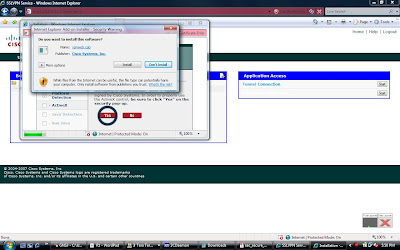
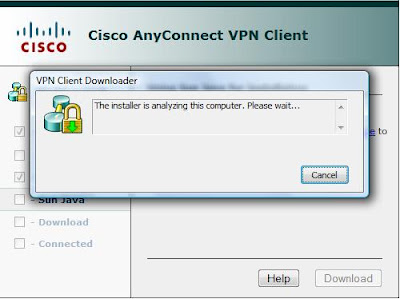
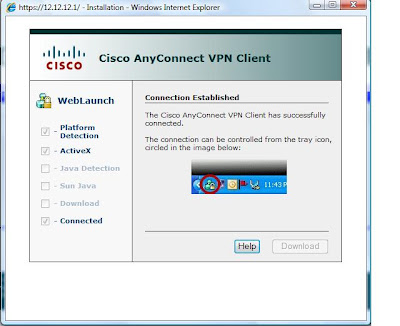
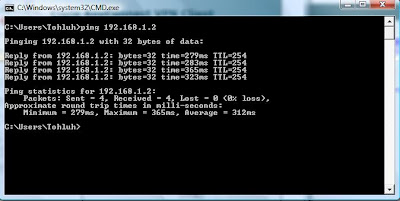
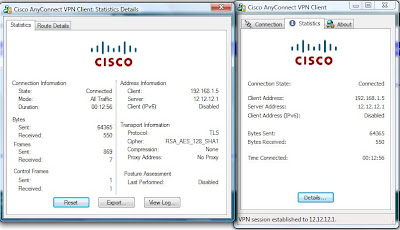 Test connectivity to the internal network..
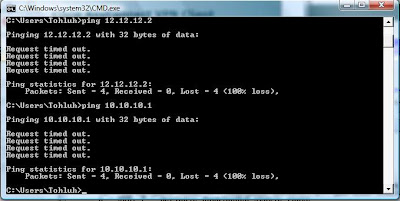
 But connectivity to the local LAN is lost...
To configure split Tunneling
WEBGATEWAY(config-webvpn-group)#svc split include 192.168.1.0 255.255.255.0
TEST Disconnect and reconnect. ;)
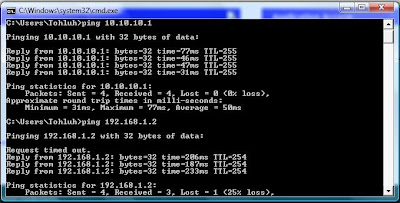
Anyconnect is up and running! :-)
N.B: When setting up SSLVPN on GNS3 using windows vista (like I did), ensure that the VPN client is copied to flash:/webvpn/svc.pkg as the router would not be able to modify the file system of the flash when you use the webvpn install command.
2. You might need to recreate a trustpoint after reloading the router.
3. If you are using the self signed certificate and Internet explorer, ensure that the webvpn gateway address is added to your trusted sites otherwise the anyconnect download would fail.
In real world scenarios, we might need to setup VPN and NAT for enhanced security (and connectivity), In the next post, I would discuss the nteroperability of NAT and VPNs.
Ciao.
Amplebrain.
To set up the anyconnect VPN client, The Anyconnect VPN Client is stored on the flash and then downloaded and installed on the client. The VPN client can be removed after the session is terminated and can be left on the client PC depending on the router configuration. If the VPN client is left on the PC, subsequent connections would not require downloading the anyconnect client on the PC.
The anyconnect-win-2.3.2016-k9.pkg is the latest release of the anyconnect client on cisco site. You need a CCO account to download this.
Steps.
1. Copy the VPN Client to the memory of the Router.
WEBGATEWAY#copy tftp flash:/webvpn/svc.pkg
Address or name of remote host []? 10.10.10.2
Source filename []? anyconnect-win-2.3.2016-k9.pkg
Destination filename [/webvpn/svc.pkg]?
Loading anyconnect-win-2.3.2016-k9.pkg from 10.10.10.2 (via FastEthernet0/0): !!!!!!!!!!!
[OK - 2672571 bytes]
Verifying checksum... CCCCC OK
2. Install the client on the router
WEBGATEWAY(config)#webvpn install svc flash:/webvpn/svc.pkg
SSLVPN Package SSL-VPN-Client : installed successfully
WEBGATEWAY(config)#
3. Set up the local pool
WEBGATEWAY(config)#ip local pool ANYCONNECT 192.168.1.5 192.168.1.50
4. Configure the webvpn context to support anyconnect.
WEBGATEWAY(config)#webvpn context SSL
WEBGATEWAY(config-webvpn-context)#policy gr SSLVPN
WEBGATEWAY(config-webvpn-group)#function svc?
svc-enabled svc-required
WEBGATEWAY(config-webvpn-group)#function svc-enabled
! svc-enabled allows fall back to thinclient and clientless mode if ! anyconnect fails.
WEBGATEWAY(config-webvpn-group)#svc address-pool ANYCONNECT
WEBGATEWAY(config-webvpn-group)#svc keep-client-installed
! keeps the vpn client on the client after the session has been terminated
TEST Here are some snapshots from my PC


 Test connectivity to the internal network..
 But connectivity to the local LAN is lost...
To configure split Tunneling
WEBGATEWAY(config-webvpn-group)#svc split include 192.168.1.0 255.255.255.0
TEST Disconnect and reconnect. ;)

Anyconnect is up and running! :-)
N.B: When setting up SSLVPN on GNS3 using windows vista (like I did), ensure that the VPN client is copied to flash:/webvpn/svc.pkg as the router would not be able to modify the file system of the flash when you use the webvpn install command.
2. You might need to recreate a trustpoint after reloading the router.
3. If you are using the self signed certificate and Internet explorer, ensure that the webvpn gateway address is added to your trusted sites otherwise the anyconnect download would fail.
In real world scenarios, we might need to setup VPN and NAT for enhanced security (and connectivity), In the next post, I would discuss the nteroperability of NAT and VPNs.
Ciao.
Amplebrain.
Thursday, August 20, 2009
Remote Access VPNS: SSL VPNS
The SSL VPN (aka webvpn) is the most flexible kind of Remote access VPN connection. All you need is an SSL enabled browser - Internet Explorer, Mozilla, Safari etc. I would go right to the configuration.
Network Diagram:

Web Gateway Configuration:
-Configure AAA for authenticaton:
aaa new-model
!
!
aaa authentication login VPN local
Configure the webvpn gateway and put it INSERVCIE
! webvpn gateway GATE
ip address 12.12.12.1 port 443
http-redirect port 80 !makes the router to listen on port 80
inservice !
Immediately after a webvpn gateway command is entered, a self-signed certificate is generated. This CA can be changed using the ssl trustpoint command.
Next the webvpn context is created...
webvpn context SSL
secondary-color blue
secondary-text-color white
!
Next, a URL-List is created;
url-list "list1"
heading "Available Pages"
url-text "Home Page" url-value "books.durable.com" !
For Thin client connection, a port-forwarding list is created.
!
port-forward "Ports"
local-port 3065 remote-server "TELNET" remote-port 23 description "telnet"
!
The pieces are tied together using the policy group command.
!
policy group SSLVPN
url-list "list1"
port-forward "Ports"
banner "Login Successful"
timeout idle 300
timeout session 3600
!
Next we set the default group policy, the AAA authentication list and add a gateway to the context.
default-group-policy SSLVPN
aaa authentication list VPN
gateway GATE
inservice
!
TESTING
I prefer to test with the end user - Here are some snapshots.

After successful authentication, we have;

When you click start, you have;

Finally, lets try to telnet to localhost port 3065

Just as we want it :-)
Up Next: Anyconnect :-)
Ciao.
Amplebrain.
Network Diagram:

Web Gateway Configuration:
-Configure AAA for authenticaton:
aaa new-model
!
!
aaa authentication login VPN local
Configure the webvpn gateway and put it INSERVCIE
! webvpn gateway GATE
ip address 12.12.12.1 port 443
http-redirect port 80 !makes the router to listen on port 80
inservice !
Immediately after a webvpn gateway command is entered, a self-signed certificate is generated. This CA can be changed using the ssl trustpoint command.
Next the webvpn context is created...
webvpn context SSL
secondary-color blue
secondary-text-color white
!
Next, a URL-List is created;
url-list "list1"
heading "Available Pages"
url-text "Home Page" url-value "books.durable.com" !
For Thin client connection, a port-forwarding list is created.
!
port-forward "Ports"
local-port 3065 remote-server "TELNET" remote-port 23 description "telnet"
!
The pieces are tied together using the policy group command.
!
policy group SSLVPN
url-list "list1"
port-forward "Ports"
banner "Login Successful"
timeout idle 300
timeout session 3600
!
Next we set the default group policy, the AAA authentication list and add a gateway to the context.
default-group-policy SSLVPN
aaa authentication list VPN
gateway GATE
inservice
!
TESTING
I prefer to test with the end user - Here are some snapshots.

After successful authentication, we have;

When you click start, you have;

Finally, lets try to telnet to localhost port 3065

Just as we want it :-)
Up Next: Anyconnect :-)
Ciao.
Amplebrain.
Monday, August 17, 2009
GET VPN - Implementation Issues
Cisco's implementation of GETVPN uses "header preservation" - the header of the IP Packet is preserved and the payload is encrypted. As a result, GETVPN is not suitable for IPSEC VPN across the internet (except the inside network uses public ip addresses). A workaround is to use GRE tunnels.
Besides this obvious caveat, there are some more subtle security issues with GETVPN. Jan Bervar highlights some of these issues in Fragments.
That said, IMHO, GETVPN is still a nice implementation of VPNs.
Besides this obvious caveat, there are some more subtle security issues with GETVPN. Jan Bervar highlights some of these issues in Fragments.
That said, IMHO, GETVPN is still a nice implementation of VPNs.
Saturday, August 15, 2009
Site to Site VPNS - Introducing Cisco's GETVPN
As I mentioned in a previous post, there are many kinds of Site to Site VPNS that can be implemented on a cisco router.
There are many resource materials on the internet on Basic Point-to-Point Site-to-Site IPSEC VPNS. I do not intend to add to the tons of materials already out there.
GRE/IPSEC VPNS are implemented similarly as all traffic is passed through the GRE tunnel (encapsulated with GRE) and the GRE traffic is now encapsulated with IPSEC. Here the GRE traffic is the Interesting traffic.
DMVPN involves setting up VPNS when they are needed between sites. This involves a combination of NHRP, mGRE, CEF and IPSEC. Petr Lapukhov, 4xCCIE, an instructor at INE has a detailed technical post on DMVPN, which can be found on the INE blog.
Boštjan Šuštar also has another technical article on DMVPN that explains it from a real world perspective. It can be found at the NIL IPCorner. I strongly recommend that you go through both materials. I dont think I have anything to add to these; they have everything on DMVPNs covered :-)
Besides, Boštjan was probably a CCIE before i could even spell a router ;)
And now, GETVPN :-)
GETVPN is cisco's new VPN technology (from IOS 12.4(6)T). The concept is simple.
VPN Sites for an organisation are in a group. The group consists of one or more key servers (more than one key server is advised for redundancy).
The group memers would request for the SAs from the server. The server is actually configured with all the SA parameters. the server just sends out the SA to the members, The server also sends the traffic to be considered INTERESTING to the members. they DO NOT negotiate SAs between each other. This Hub and spoke mechanism is used to download the SAs.
The actual IPSEC communicaion occurs on a full mesh topology as the spokes just encrypt the traffic based on the information downloaded fron the key server.
There are many resource materials on the internet on Basic Point-to-Point Site-to-Site IPSEC VPNS. I do not intend to add to the tons of materials already out there.
GRE/IPSEC VPNS are implemented similarly as all traffic is passed through the GRE tunnel (encapsulated with GRE) and the GRE traffic is now encapsulated with IPSEC. Here the GRE traffic is the Interesting traffic.
DMVPN involves setting up VPNS when they are needed between sites. This involves a combination of NHRP, mGRE, CEF and IPSEC. Petr Lapukhov, 4xCCIE, an instructor at INE has a detailed technical post on DMVPN, which can be found on the INE blog.
Boštjan Šuštar also has another technical article on DMVPN that explains it from a real world perspective. It can be found at the NIL IPCorner. I strongly recommend that you go through both materials. I dont think I have anything to add to these; they have everything on DMVPNs covered :-)
Besides, Boštjan was probably a CCIE before i could even spell a router ;)
And now, GETVPN :-)
GETVPN is cisco's new VPN technology (from IOS 12.4(6)T). The concept is simple.
VPN Sites for an organisation are in a group. The group consists of one or more key servers (more than one key server is advised for redundancy).
The group memers would request for the SAs from the server. The server is actually configured with all the SA parameters. the server just sends out the SA to the members, The server also sends the traffic to be considered INTERESTING to the members. they DO NOT negotiate SAs between each other. This Hub and spoke mechanism is used to download the SAs.
The actual IPSEC communicaion occurs on a full mesh topology as the spokes just encrypt the traffic based on the information downloaded fron the key server.
Implementation:
Diagram:

Basic Configuration
Key Server:
conf t
hostname R1
interface Serial 0/0
ip address 172.16.14.1 255.2552.255.0
end
Group member 1
conf t
hostname R2
interface Serial0/0
ip address 172.16.24.2 255.255.255.0
end
interface Loopback0
ip address 192.168.2.1 255.255.255.0
end
Group Member 2
conf t
hostname R3
interface Serial0/0
ip address 172.16.24.2 255.255.255.0
end
int loopback 0
ip address 192.168.3.1 255.255.255.0
end
Server Configuration;
access-list 103 permit ip 192.168.0.0 0.0.255.255 192.168.0.0 0.0.255.255
!
crypto isakmp policy 10
encr 3des
authentication pre-share
group 2
!
crypto isakmp key cisco address 172.16.24.2
crypto isakmp key cisco address 172.16.34.3
!
crypto ipsec transform-set TRANSF esp-3des esp-md5-hmac
!
crypto ipsec profile GETVPN
set transform-set TRANSF
!
crypto gdoi group VPN
identity number 1
!
server local
!
rekey retransmit 10 number 3
registration interface Serial0/0
sa ipsec 10
!
profile GETVPN
match address ipv4 103
!
Group Member Configuration (Identical on both sides):
crypto isakmp policy 10
encr 3des
authentication pre-share
group 2
crypto isakmp key cisco address 172.16.14.1
crypto gdoi group VPN
identity number 1
server address ipv4 172.16.14.1
crypto map GETVPN 10 gdoi
set group VPN
interface s0/0
crypto map GETVPN
Test :-)
R2(config-if)#do sh cry ipsec sa
interface: Serial0/0
Crypto map tag: GETVPN, local addr 172.16.24.2
protected vrf: (none)
local ident (addr/mask/prot/port): (192.168.0.0/255.255.0.0/0/0)
remote ident (addr/mask/prot/port): (192.168.0.0/255.255.0.0/0/0)
current_peer 172.16.14.1 port 848
PERMIT, flags={}
#pkts encaps: 0, #pkts encrypt: 0, #pkts digest: 0
#pkts decaps: 0, #pkts decrypt: 0, #pkts verify: 0
#pkts compressed: 0, #pkts decompressed: 0
#pkts not compressed: 0, #pkts compr. failed: 0
#pkts not decompressed: 0, #pkts decompress failed: 0
#send errors 0, #recv errors 0
local crypto endpt.: 172.16.24.2, remote crypto endpt.: 172.16.14.1
path mtu 1500, ip mtu 1500, ip mtu idb Serial0/0
current outbound spi: 0x38FEDAF9(956226297)
inbound esp sas:
spi: 0x38FEDAF9(956226297)
transform: esp-3des esp-md5-hmac ,
in use settings ={Tunnel, }
conn id: 5, flow_id: SW:5, crypto map: GETVPN
sa timing: remaining key lifetime (k/sec): (4415223/1967)
IV size: 8 bytes
replay detection support: Y
Status: ACTIVE
inbound ah sas:
inbound pcp sas:
outbound esp sas:
spi: 0x38FEDAF9(956226297)
transform: esp-3des esp-md5-hmac ,
in use settings ={Tunnel, }
conn id: 6, flow_id: SW:6, crypto map: GETVPN
sa timing: remaining key lifetime (k/sec): (4415223/1960)
IV size: 8 bytes
replay detection support: Y
Status: ACTIVE
outbound ah sas:
outbound pcp sas:
Next, we would try to Ping and watch the encaps/decaps field
R2(config-if)#do ping 192.168.3.1 sou lo0
Type escape sequence to abort.
Sending 5, 100-byte ICMP Echos to 192.168.3.1, timeout is 2 seconds:
Packet sent with a source address of 192.168.2.1
!!!!!
Success rate is 100 percent (5/5), round-trip min/avg/max = 176/356/552 ms
R2(config-if)#do sh cry ipsec sa
interface: Serial0/0
Crypto map tag: GETVPN, local addr 172.16.24.2
protected vrf: (none)
local ident (addr/mask/prot/port): (192.168.0.0/255.255.0.0/0/0)
remote ident (addr/mask/prot/port): (192.168.0.0/255.255.0.0/0/0)
current_peer 172.16.14.1 port 848
PERMIT, flags={}
#pkts encaps: 5, #pkts encrypt: 5, #pkts digest: 5
#pkts decaps: 5, #pkts decrypt: 5, #pkts verify: 5
#pkts compressed: 0, #pkts decompressed: 0
#pkts not compressed: 0, #pkts compr. failed: 0
#pkts not decompressed: 0, #pkts decompress failed: 0
#send errors 0, #recv errors 0
local crypto endpt.: 172.16.24.2, remote crypto endpt.: 172.16.14.1
path mtu 1500, ip mtu 1500, ip mtu idb Serial0/0
current outbound spi: 0x38FEDAF9(956226297)
inbound esp sas:
spi: 0x38FEDAF9(956226297)
transform: esp-3des esp-md5-hmac ,
in use settings ={Tunnel, }
conn id: 5, flow_id: SW:5, crypto map: GETVPN
sa timing: remaining key lifetime (k/sec): (4415222/1920)
IV size: 8 bytes
replay detection support: Y
Status: ACTIVE
inbound ah sas:
inbound pcp sas:
outbound esp sas:
spi: 0x38FEDAF9(956226297)
transform: esp-3des esp-md5-hmac ,
in use settings ={Tunnel, }
conn id: 6, flow_id: SW:6, crypto map: GETVPN
sa timing: remaining key lifetime (k/sec): (4415222/1917)
IV size: 8 bytes
replay detection support: Y
Status: ACTIVE
outbound ah sas:
outbound pcp sas:
The icmp packets are encrypted in IPSEC
R2(config-if)#do sh cry isa sa
IPv4 Crypto ISAKMP SA
dst src state conn-id slot status
172.16.14.1 172.16.24.2 GDOI_IDLE 1003 0 ACTIVE
IPv6 Crypto ISAKMP SA
On the server.
R1#sh cry gdoi
Group Information
Group Name : VPN
Group Identity : 1
Group Members Registered : 2
Group Server : Local
Group Rekey Lifetime : 86400 secs
Rekey Retransmit Period : 10 secs
Rekey Retransmit Attempts : 3
IPSec SA Number : 10
IPSec SA Rekey Lifetime : 3600 secs
Profile Name : GETVPN
SA Rekey
Remaining Lifetime : 3010 secs
access-list 103 permit ip 192.168.0.0 0.0.255.255 192.168.0.0 0.0.255.255
Group Member List for Group VPN :
Member ID : 172.16.24.2
Member ID : 172.16.34.3
Everything is up and running. :-)
I have already posted on EZVPNS, so the only VPN configuration left is the SSL VPN. I would try to get that done in the coming week. :-)
Ciao.
Amplebrain.
Friday, August 14, 2009
Cloud Computing - Security Threats?
Cloud computing appears to be the next phase of computing. The new Google operating system would operate on the cloud computing platform.
While it definitely has its pros, the black hat USA conference last week has drawn our attention to some security threats with cloud computing. More info can be found on readwriteweb.
Again, we have to deal with it :-)
Ciao.
While it definitely has its pros, the black hat USA conference last week has drawn our attention to some security threats with cloud computing. More info can be found on readwriteweb.
Again, we have to deal with it :-)
Ciao.
Thursday, August 13, 2009
Why cant we just trust the internet??
Hello,
I have been studying Internet and WAN security lately and I just think it would be a lot better if the internet was secure. So let's start a campaign for "Ethical Internet Practices ;)".
Well, I have to come to terms with reality. The internet is going to remain UNSAFE for a long time. So we are going to deal with it. What options do we have?
1. Provide WAN infrastructure for all our private traffic: While this would be 'SAFE', it is no longer scalable as we have branch offices everywhere and even telecommuters. Some employees don't even know the location of the corporate offices anymore (they all work from home :-) ). Besides, this way too expensive, I'm sure your boss would not buy that either!
2. Secure our traffic and use the internet as our WAN infrastructure. We would kill two birds with one stone and we would still be friends with the finance department. :-) Welcome to the world of VIRTUAL PRIVATE NETWORKING
As a network engineer, i know VPNS have been around for a while and they have grown and become very scalable. Thankfully cisco gives us many options to suite our peculiar needs.
Broadly we have two kinds of VPN
1. Site to Site VPNS:
-IPSec VPNS
-GRE/IPSEC for communiction of routing protocols
-Dynamic Multipoint VPNS (Hub and Spoke and Spoke to Spoke)
-Group Encrypted Transport (GET) VPNS
2. Remote Access VPNS (for telecommuters)
-SSL VPN (also known as webVPN)
-Easy VPN
I don't want to get into the configuration details yet but I would post some more technical details soon.
As you must have already noticed, I am a cisco advocate and my configuration would be mostly cisco-oriented.
Feel free to post your personal experience with these technologies.
Later.
Amplebrain.
I have been studying Internet and WAN security lately and I just think it would be a lot better if the internet was secure. So let's start a campaign for "Ethical Internet Practices ;)".
Well, I have to come to terms with reality. The internet is going to remain UNSAFE for a long time. So we are going to deal with it. What options do we have?
1. Provide WAN infrastructure for all our private traffic: While this would be 'SAFE', it is no longer scalable as we have branch offices everywhere and even telecommuters. Some employees don't even know the location of the corporate offices anymore (they all work from home :-) ). Besides, this way too expensive, I'm sure your boss would not buy that either!
2. Secure our traffic and use the internet as our WAN infrastructure. We would kill two birds with one stone and we would still be friends with the finance department. :-) Welcome to the world of VIRTUAL PRIVATE NETWORKING
As a network engineer, i know VPNS have been around for a while and they have grown and become very scalable. Thankfully cisco gives us many options to suite our peculiar needs.
Broadly we have two kinds of VPN
1. Site to Site VPNS:
-IPSec VPNS
-GRE/IPSEC for communiction of routing protocols
-Dynamic Multipoint VPNS (Hub and Spoke and Spoke to Spoke)
-Group Encrypted Transport (GET) VPNS
2. Remote Access VPNS (for telecommuters)
-SSL VPN (also known as webVPN)
-Easy VPN
I don't want to get into the configuration details yet but I would post some more technical details soon.
As you must have already noticed, I am a cisco advocate and my configuration would be mostly cisco-oriented.
Feel free to post your personal experience with these technologies.
Later.
Amplebrain.
Subscribe to:
Posts (Atom)